NVIDIA DLSS 4.5: Revolution in AI Frame Generation
April 03, 2026
If you’ve been following gaming tech even casually, you’ve probably heard about DLSS. But DLSS 4.5 isn’t just another incremental update—it’s a massive leap that changes how frames are created altogether. Imagine rendering just one frame and letting AI generate up to five additional ones in between. Sounds unreal? That’s exactly what NVIDIA is doing now.
Recent reports confirm that DLSS 4.5 introduces 6X Multi Frame Generation, meaning up to five AI-generated frames for every one traditionally rendered frame. This isn’t just about boosting FPS numbers—it’s about redefining how games feel, look, and respond.
So, what does this actually mean for you as a gamer? Higher FPS, smoother gameplay, and the possibility of 4K gaming at 240Hz with path tracing—a level of visual fidelity that was practically unreachable just a couple of years ago.
Let’s break it all down step by step.
What is DLSS Technology?
At its core, DLSS (Deep Learning Super Sampling) is NVIDIA’s AI-powered upscaling technology. Instead of rendering every pixel natively—which is extremely demanding—DLSS renders fewer pixels and uses AI to reconstruct the image to near-native (or sometimes better-than-native) quality.
Think of it like watching a low-resolution video that magically sharpens itself into 4K in real time. That’s DLSS in action.
The magic behind DLSS lies in neural networks trained on massive datasets. These networks learn how high-quality images should look and then apply that knowledge to reconstruct frames during gameplay. Over time, DLSS has evolved from a rough upscaling tool into a sophisticated AI rendering system.
Evolution from DLSS 1.0 to DLSS 4.5
DLSS didn’t start this powerful. Early versions had issues—blurry visuals, ghosting, and inconsistent results. But NVIDIA kept refining the tech.
- DLSS 1.0: Basic AI upscaling, limited quality
- DLSS 2.0: Major leap with temporal reconstruction
- DLSS 3: Introduced Frame Generation
- DLSS 4: Multi Frame Generation (up to 3 AI frames)
- DLSS 4.5: Up to 5 AI frames per real frame
That’s a huge jump. We’re no longer just enhancing frames—we’re creating entirely new ones using AI.
Key Milestones in NVIDIA AI Rendering
The biggest turning point came when NVIDIA switched to transformer-based AI models, similar to those used in modern language models. These models are significantly better at understanding spatial and temporal data, which is crucial for generating realistic frames.
DLSS 4.5 now uses a second-generation transformer model, delivering better image quality and fewer artifacts.
What’s New in DLSS 4.5
DLSS 4.5 introduces several groundbreaking features, but two stand out:
- 6X Multi Frame Generation
- Dynamic Frame Generation
Let’s unpack them.
Multi Frame Generation Explained
Traditional rendering produces one frame at a time. DLSS 4 introduced the idea of generating additional frames using AI. DLSS 4.5 takes this concept further.
Now, for every real frame rendered by the GPU, AI can generate up to five additional frames, effectively multiplying performance.
How 6X Frame Generation Works
Instead of:
- Frame → Frame → Frame
You now get:
- Real Frame → AI Frame → AI Frame → AI Frame → AI Frame → AI Frame
This results in smoother motion and dramatically higher FPS.
According to NVIDIA, this can push performance into 240+ FPS territory even in demanding 4K path-traced games.
Dynamic Frame Generation
Static frame generation is powerful—but not always optimal. That’s where Dynamic Frame Generation comes in.
Automatic FPS Optimization
Dynamic Frame Generation works like an automatic transmission in a car. It adjusts the number of generated frames in real time based on:
- GPU load
- Target FPS
- Display refresh rate
This ensures the best balance between performance, latency, and image quality.
How Multi Frame Generation Works
Let’s simplify the concept.
AI-Generated Frames vs Real Frames
Real frames are rendered traditionally by the GPU. AI-generated frames are predicted using:
- Previous frames
- Motion vectors
- Scene data
The AI essentially “guesses” what the next frame should look like—and does it extremely accurately.
Transformer Models in DLSS 4.5
DLSS 4.5 uses a second-generation transformer model, which significantly improves prediction accuracy.
This results in:
- Better motion clarity
- Reduced ghosting
- More stable UI elements
And here’s the kicker: in some tests, users actually preferred DLSS output over native rendering.
Performance Boost: Real Numbers
Let’s talk numbers—because that’s what gamers care about.
FPS Gains in Modern Games
With DLSS 4.5:
- FPS can increase up to 6x in ideal scenarios
- Games that ran at 40 FPS can reach 200+ FPS
- High-end GPUs can fully utilize 240Hz displays
4K and Path Tracing Improvements
Path tracing is incredibly demanding. DLSS 4.5 makes it playable.
You can now:
- Run full path tracing at 4K
- Maintain high frame rates
- Enjoy ultra-realistic lighting and reflections
This is a huge deal for next-gen gaming visuals.
Image Quality Improvements
Performance is great—but what about visuals?
Second-Generation Transformer Model
The new AI model brings:
- Sharper textures
- Better lighting reconstruction
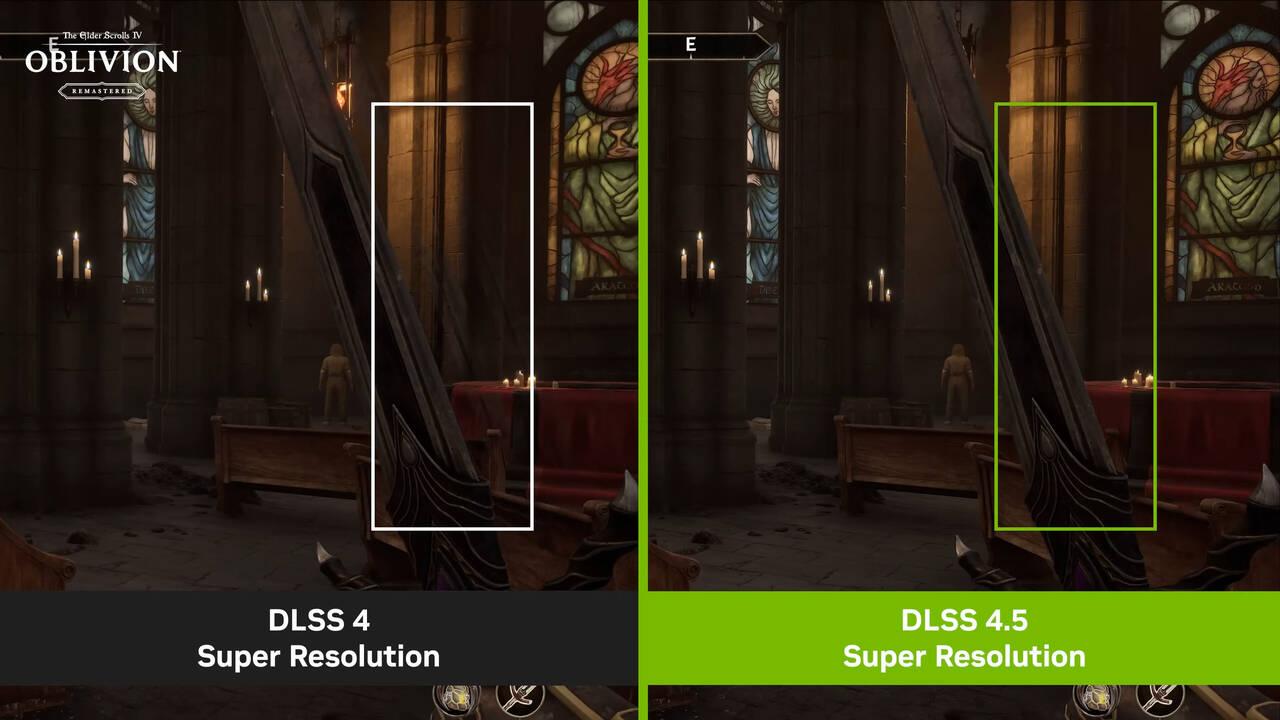
- Improved temporal stability
Reduction of Artifacts
DLSS 4.5 significantly reduces:
- Ghosting
- Flickering
- Blurry edges
It even improves small UI details like mini-maps and text.
Supported Hardware and Requirements
Not everyone gets the full experience.
RTX 50 Series Exclusivity
The full power of DLSS 4.5—especially 6X frame generation—is currently available only on:
- RTX 50 series GPUs
Compatibility with Older GPUs
Older GPUs (RTX 20/30/40) can still use:
- DLSS Super Resolution
- Some frame generation features
But they won’t get the full 6X boost.
DLSS 4 vs DLSS 4.5
Let’s compare.
|
Feature |
DLSS 4 |
DLSS 4.5 |
|
Frame Generation |
Up to 4X |
Up to 6X |
|
AI Model |
Transformer (1st gen) |
Transformer (2nd gen) |
|
Dynamic Adjustment |
No |
Yes |
|
Image Quality |
High |
Ultra-high |
|
Supported Games |
250+ |
400+ |
Gaming Experience Transformation
So how does it actually feel?
Smoothness and Latency
Higher FPS means smoother gameplay—but AI frames introduce concerns about latency.
NVIDIA claims that DLSS 4.5 maintains responsiveness while boosting FPS.
Real-World Gameplay Impressions
Players report:
- Ultra-smooth motion
- More immersive visuals
- Better performance in demanding titles
It’s like upgrading your GPU without actually buying a new one.
Pros and Cons of DLSS 4.5
Pros:
- Massive FPS boost
- Better image quality
- Advanced AI rendering
- Dynamic optimization
Cons:
- Limited to newer GPUs
- Potential latency concerns
- Requires game support
Future of AI Rendering
DLSS 4.5 is just the beginning.
DLSS 5 and Beyond
NVIDIA has already hinted at DLSS 5, promising even bigger breakthroughs.
We’re moving toward a future where:
- AI handles most rendering
- GPUs focus on core tasks
- Real-time photorealism becomes standard
Conclusion
DLSS 4.5 isn’t just an upgrade—it’s a shift in how games are rendered. By generating up to five AI frames for every real one, NVIDIA is pushing performance and visuals into a new era.
If you’re using an RTX 50 series GPU, you’re essentially getting a glimpse into the future of gaming. And if not? Well, that future is coming faster than you think.